


Personal Injury Lawyer Website Design A Practical Planning Guide

Table of Contents

Share This Article

Personal Injury Lawyer Website Design A Practical Planning Guide

Someone visiting a personal injury law firm’s website may have a specific question and little patience for an unclear page. They need to understand the type of work the firm handles, find trustworthy information and see the appropriate next step.
The design should support that process. A dramatic hero image cannot make up for missing practice information or an enquiry route that is difficult to use.

Begin with the visitor’s questions

A practice-area page should explain its purpose in plain language. The firm needs to decide which matters it handles and approve the information used to describe them. Do not build a collection of near-identical pages merely to target variations of “personal injury lawyer website design” or local search terms.

For the underlying service, our law firm website design page covers content structure, profiles and development scope.

Help visitors identify the relevant information
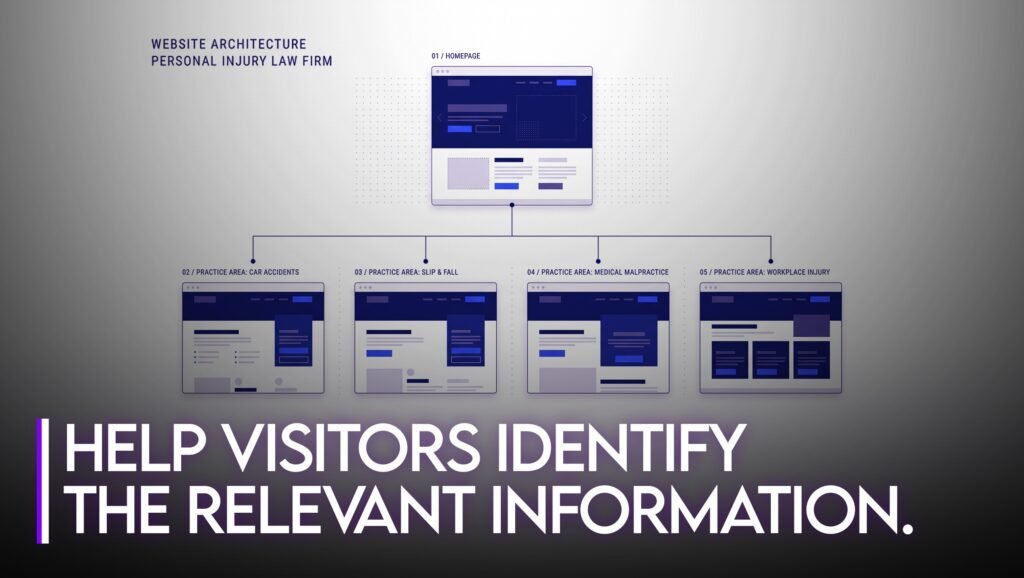
Use clear page names and a logical hierarchy. A visitor should not have to interpret internal practice terminology to find the right information. More detailed material can sit beneath a straightforward overview.
Make the next step accurate
Describe what the initial contact route is for. A consultation request, a callback request and a case-intake process are not necessarily the same thing. The wording and handling should reflect the firm’s actual process.

Present attorney information clearly

Profiles can help visitors understand the people behind the firm. Use approved names, roles, credentials and photographs. Keep that information current and assign an internal owner for changes.
Avoid claims that cannot be substantiated, including invented rankings or broad statements about being the best. Clear, accurate information provides a firmer basis for a visitor’s decision than unsupported superlatives.

Handle project proof and claims carefully

Testimonials and case results need their own approvals and context. A website designer should not invent client outcomes or assume that material can be reused without review. The firm should decide what is appropriate to publish and how it must be presented.
This planning guide concerns website content and functionality; it does not establish legal-advertising compliance. The practice should use its own review process for that question.

Design the contact journey before adding more fields

An initial form should ask only for information appropriate to that channel and stage. Detailed confidential information should not be invited through an ordinary public contact field simply because it is convenient to add.
If the firm uses an intake or booking system, review how the website connects to it. Test the complete journey, including the destination, confirmation and internal routing. A working button alone does not demonstrate a working process.

A practical checklist for comparing quotes

Review mobile use

Headings, contact options and form fields must remain usable on smaller screens. Check that a fixed header or floating control does not obscure important information. Test with real content, not only short sample headings.

Choose an editing approach the firm can maintain

Practice information and team details change. Agree who can make routine edits, who approves specialist content and who maintains connected systems. WordPress development or another CMS can support that work, but the setup and responsibilities need to be clear.
For a redesign, inventory existing content and URLs before changing the structure. Useful pages should not disappear simply because the visual design is being replaced.

Scope the project before comparing prices

List the required practice pages, profiles, integrations and content tasks. Decide what will be supplied by the firm and what belongs in the project. Read our law firm website cost guide for a checklist that makes proposals easier to compare.

Questions to take into a project discussion

– Which visitor questions must the website answer?
– Who approves practice-area content and professional claims?
– Which system handles initial enquiries?
– What should the first form collect—and what should it avoid?
– Who maintains profiles and service information after launch?
– Which existing pages and URLs need to be preserved?

Questions to take into a project discussion

The most useful brief describes the firm’s services, audience and workflow. Bring that information and the current website to a law firm website discussion. The aim is a clearer, maintainable site with an appropriate enquiry journey, not an unsupported promise of consultations.

What type of content should a personal injury law firm website focus on?
The website should explain its purpose in plain language, focusing on clear, approved information about the specific legal matters the firm handles. Avoid building a collection of near-identical pages merely to target local SEO keywords.
Initial contact forms should only collect basic information appropriate for an early enquiry. Firms should avoid asking for detailed, confidential information through standard public fields and ensure the entire intake journey works smoothly on both desktop and mobile.
Profiles should feature current, approved names, roles, credentials, and photographs. The website must avoid unsubstantiated claims, invented rankings, or broad statements about being “the best.” All testimonials and case outcomes require a strict internal review and approval process before publishing.
The firm needs a clear editing approach, often supported by a CMS like WordPress, to keep practice information and team details current. It is important to agree internally on who makes routine edits and who has the authority to approve specialist legal content.

Get a scope your firm can evaluate

Prepare the current URL, practice areas, required integrations and content responsibilities. Discuss your law firm website project to turn that information into a clearer scope.

Join Allusive Digital marketing newsletter

Related Blogs